# Working with Cross-sections
The **View interface** in VoxelSpace allows users to perform real-time cross-section operations across spatial datasets. This tool is ideal for analyzing subsurface structures, internal geometries, or layered data distributions.
---
**Accessing Cross-Section Tools**
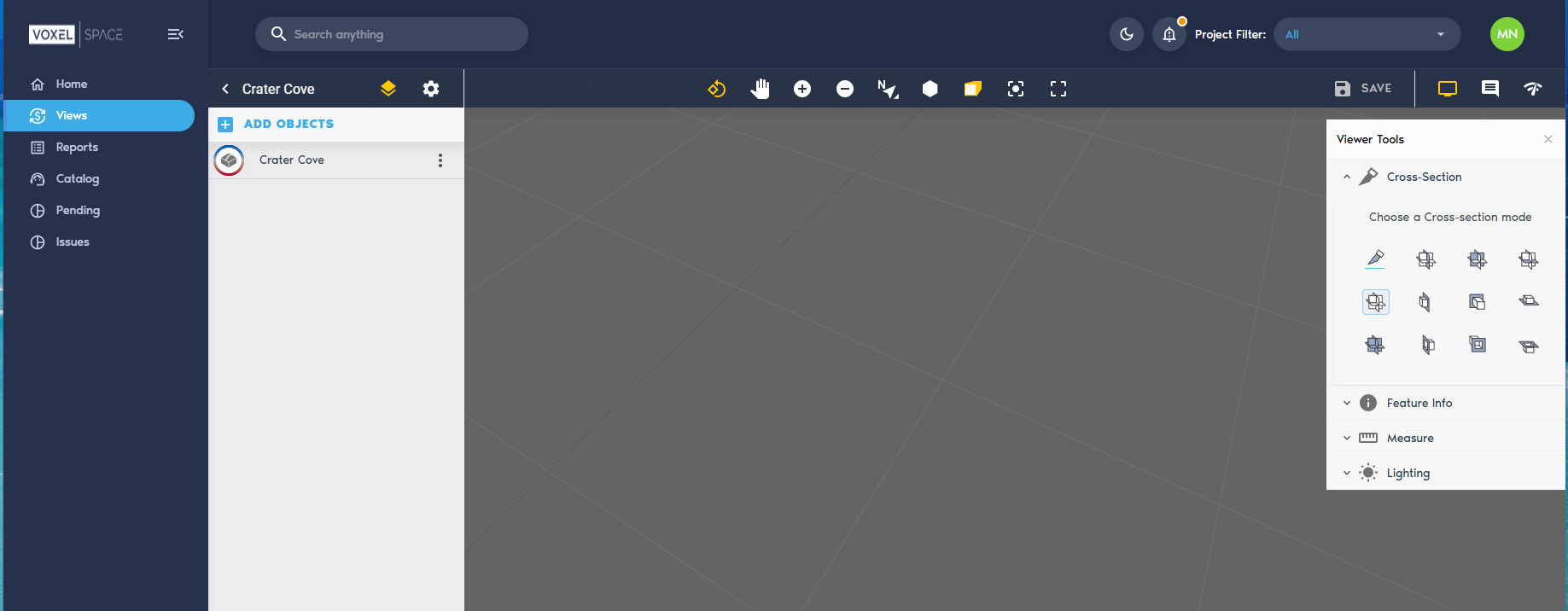
1. While viewing a dataset, open the **Viewer Tools panel**.
2. Click on the **“Cross-section”** option to activate the cross-section controls.
[](https://help.mystart.com/uploads/images/gallery/2025-03/JDLimage.png)
**Selecting Cross-Section Types**
Once the tool is enabled, you can choose from various **cross-section types** to define how the cut will interact with the 3D scene. These options typically include:
- **Single plane** – Cuts through the model along one axis
- **Box clip** – Isolates a defined volume within a bounding box
- **Axis-aligned slices** – Slices perpendicular to X, Y, or Z for sectional analysis
- *(Insert specific options from UI if applicable)*
---
Cross-sections can be adjusted in real time—move, rotate, or scale the clipping planes to refine your view and focus on specific features of interest.