Program
A Program entity stores custom Python code within a project. These scripts allow you to automate tasks, generate volumetric data, perform spatial analysis, or control visual representations of datasets.
Add custom Python scripts that serve as generators, report engines, or view composers.
→ Supports automation, data extraction, and interactive visual logic.
Types of Program Entities
There are three supported program types in VoxelSpace:
- Voxel Generator
Used to create custom volumetric objects through procedural generation. These scripts can be applied in Voxel Generator entities.
For more details, refer to the Voxel Generator Programs section.
- Report
Executes code over a defined spatial region to collect, analyze, and summarize spatial data. Ideal for inspections, calculations, and data extraction.
See the Report Programs section for more information.
- View
Controls how multiple datasets are rendered on screen. This allows for custom visual compositions or dynamic visual layers.
Learn more in the View Programs section.
Creating a Program Entity
- Go to your project’s Catalog section.
- Click “Add Object” and select “Program” from the list.
- Enter the following information:
|
Field |
Description
|
|
Program Name |
A readable, descriptive name for the program.
|
|
Type |
Select the program type: Voxel Generator, Report, or View.
|
|
Code |
Paste or write your custom Python code for the selected purpose. |
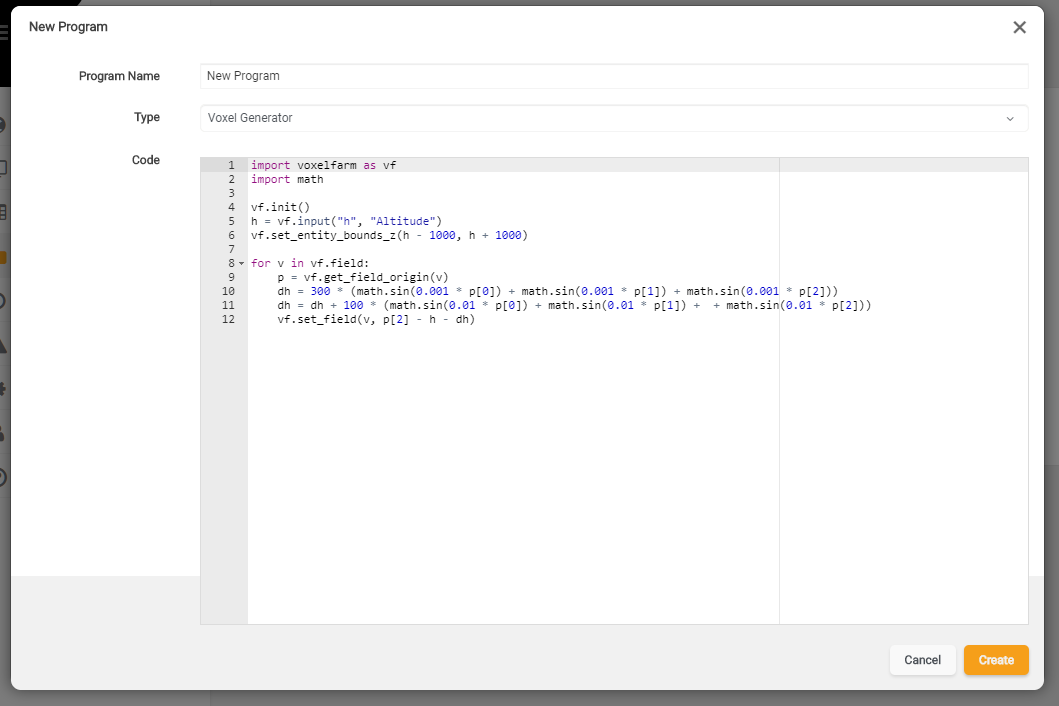
Once saved, your Program entity will be available for use in corresponding entity types depending on its category.