# Indexed Point Cloud (Processed)
An **Indexed Point Cloud** is a spatially-processed version of a raw Point Cloud entity. By applying the project’s spatial index, this format enables fast visualization, filtering, and integration with other spatial datasets in VoxelSpace.
---
**Creating an Indexed Point Cloud**
1. Navigate to the **Catalog** section of your project.
2. Click the **“Add Object”** button and select **“Indexed Points”** from the dropdown menu.
[](https://help.mystart.com/uploads/images/gallery/2025-03/w0kimage.png)
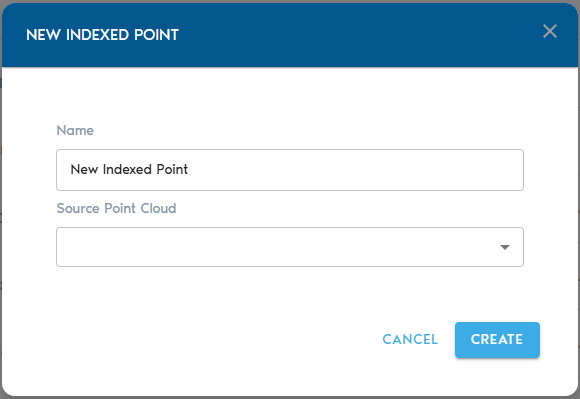
3. Complete the required fields:
**Field**
**Description**
**Item Name**
A clear, descriptive name for the new Indexed Point Cloud entity.
**Source Mesh**
Select a raw **Point Cloud** from the list. This will serve as the input for the indexing process.
**Indexing the Point Cloud**
- After selecting your source and providing a name, click **“Create”** to initiate the indexing process.
- You can monitor the progress in the project’s **“Pending”** section.
---
**Viewing the Indexed Point Cloud**
Once processing is complete:
- Use the **“View”** button next to the Indexed Point Cloud in the Catalog to open and explore it.
- Alternatively, you can create a **View entity** and designate the Indexed Point Cloud as its data source for broader analysis and visualization.