Serverless .Net Lambdas
- Submitting .Net Lambdas
- Writing Report Lambdas
- IVoxelFarmReportLambda
- IVoxelFarmReportLambdaHost
- IVoxelFarmReportDoneLambdaHost
- Report Lambda Examples
Submitting .Net Lambdas
The platform allows users to run Spatial Lambdas that are compiled as standard .Net assemblies.
Currently, .Net assemblies are supported only for REPORT programs. GENERATOR and VIEW programs must still be created using Python.
Spatial operations using .Net assemblies see a performance increase over 30 times compared to an equivalent workload running in Python.
Creating the assembly
In order to create a .Net assembly, the developer will follow these steps:
- Create a .Net Standard Class Library project
- Add the .Net VoxelFarmClientLibrary to the project
- Create a class in the Library that implements the desired Spatial Lambda interface (for instance IVoxelFarmReportLambda)
- Compile the assembly into a DLL, if necessary, package the DLL and dependencies into a ZIP file
Creating/updating the PROGRAM entity
Before running the Spatial Lambda, the user must create a PROGRAM entity that contains the .Net assembly for the Lambda code.
The user can choose between two options when it comes to creating the new entity:
1. Using the admin Web UI:
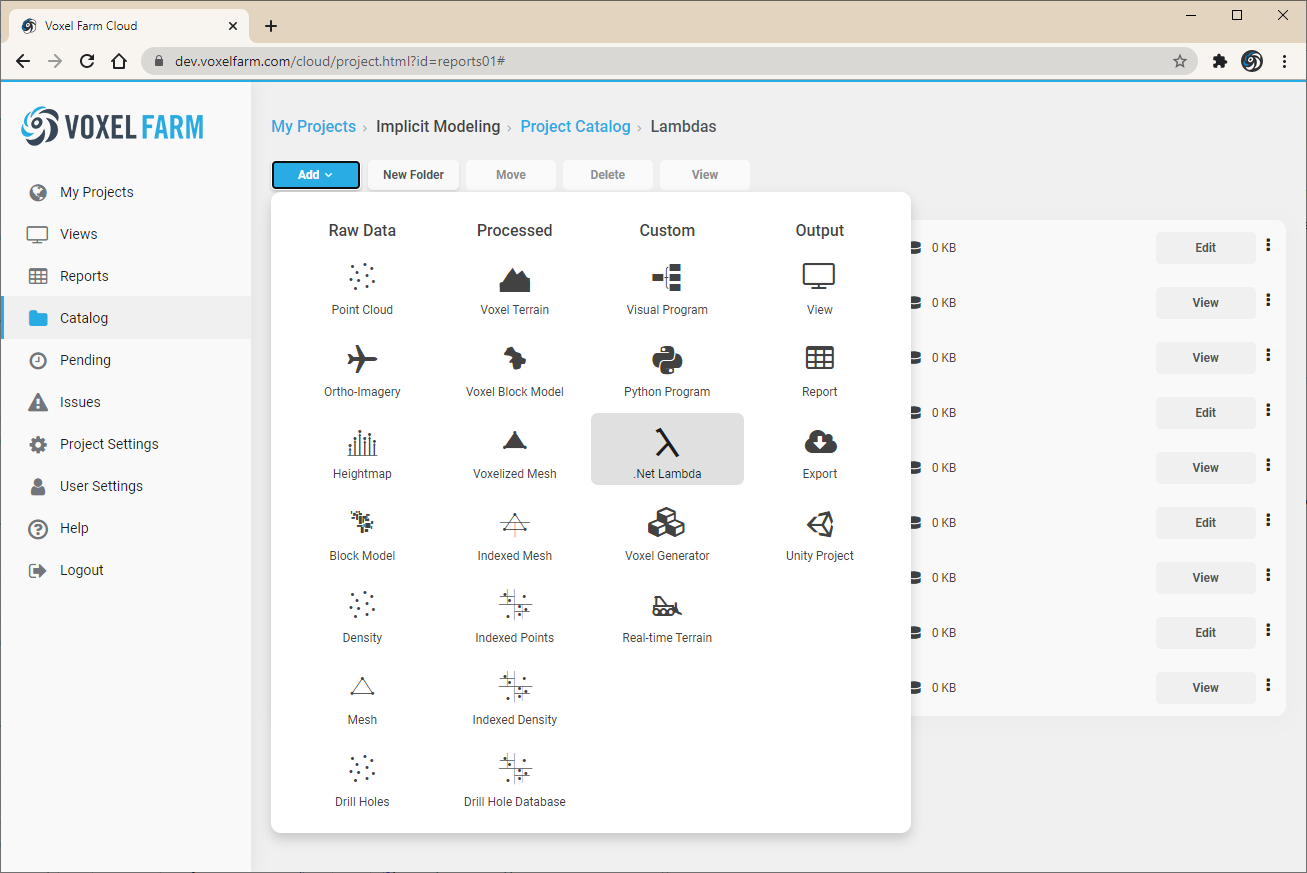
First, select Add > .Net Lambda from the Catalog section in the UI:
Provide a name for the program, and information about the Lambda class that will be used as entrypoint:
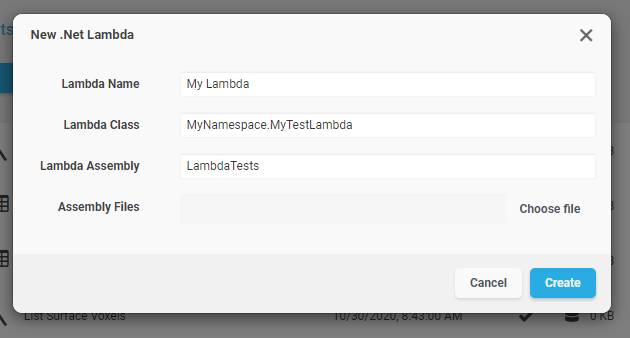
Click on "Choose file" to select one or multiple files that will be associated to the Spatial Lambda.
Once the use clicks on "Create", the platform validates the code and discovers which inputs the Lambda expects. From this point on, the Lambda is available for running as a spatial report.
2. Using the REST API:
The user can create and validate a new PROGRAM entity by making this sequence of REST calls:
- Create a PROGRAM entity, specifying "NETASM" in the code_origin property. See the Triggering Reports example to see how this is performed for a Python program.
- Upload the assembly files as an attachment to the entity. See the Uploading Entity Files section.
- Request the system to process the new program. This is so the platform can discover which inputs this program will require later, once it is ran by users. See the Triggering Reports topic for more information on how to trigger a processing job.
Writing Report Lambdas
Reports are processes that the platform runs over spatial datasets in a massively parallel fashion. The code for these processes can be supplied entirely by users, and can be provided as a Python program or a .Net assembly. This topic covers how to implement a Report process using a .Net assembly and C#.
In broad strokes, the user is required to:
- Create a class in C# that implements the report interface (IVoxelFarmReportLambda)
- Include that class in a library, and upload the .Net assembly for the library to the spatial project that contains the data to be used in the report
- Create a report entity that applies the uploaded .Net assembly program to a given region of space
This topic focuses on how a user would create an implementation of the IVoxelFarmReportLambda interface. See the Creating Spatial Lambdas in C# topic to learn more about how to import the lambda code into the platform. The Triggering Reports topic discuses how to start a report over a given spatial region.
Stages of a Spatial Report's execution
Before looking at how an implementation of the report lambda class would be made, it helps to understand the different stages a spatial report will go through:

Stage 1: Gather Inputs. During this stage, the report asks questions to the user or caller. For instance if the report is computing the interaction between two or more datasets, the report code could require these inputs to be provided.
Stage 2: Create Data Mashups. Based on the inputs that were provided in the earlier stage, and following the intent of the report, the report code will combine the datasets in particular ways that are useful to the report. Volumetric datasets can be easily combined by stacking them together, or by performing volumetric boolean operations like Union, Intersection and Complements.
Stage 3: Iterate and analyze data. In this stage, the report iterates over the results of the data mashups and gets to inspect the results. This could lead to the discovery of new facts about the information which the report can accumulate using special devices like Sums and Lists. See the following section for a better understanding of Sums and Lists.
Stage 4: Summarize results. The platform runs earlier stages in a massively parallel fashion. This fact is transparent to the programmer who writes the report, as the report code can be written as if it was running in a fully serial manner. There is, however, one last stage that does not in parallel, and runs once all the parallel processing is complete. During this stage, it is possible to look at the results gathered by the massively parallel stages and produce new facts and data for the report.
Sums and Lists
Report Lambda classes must be stateless. The platform runs the code in a large number of nodes at the same time, for this reason the implementation of the report interface must be purely functional.
Since they are stateless, report lambdas can use two concepts provided by the platform to remember the facts they are discovering: Sums and Lists.
A Sum is a global counter. A report can start as many Sums as it needs. The platform integrates all the partial values for each Sum as they are produced by parallel executions of the spatial lambda that target disjoint regions of space. A simple example of a sum would be how a lambda computes the volume of a very large object. The code would declare a singe sum for the final volume, and then add the volume of each voxel to the sum.
A List allows to collect a series of facts as the lambda executes over space. For instance, assume a report needs to add an entry to an error log wherever certain condition is met by the inspected data. By using a List, the programmer could emit one entry for the list every time an error is detected. Once the report completes, the last stage would be able to access every entry in the list and perform additional actions.
The IVoxelFarmReportLambda interface
A spatial report lambda is required to implement the IVoxelFarmReportLambda interface. This interface is included in the VoxelFarmCloudLibrary assembly.
Implementing the interface requires implementing only two methods, which cover all the execution stages:
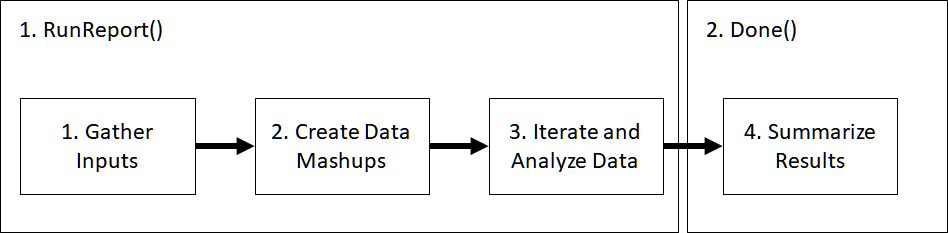
- RunReport: This method takes one parameter of type IVoxelFarmReportLambdaHost, called the lambda's "host". The host provides the functionality required to interact with the platform, including asking for inputs, loading data and creating mashups. In this function, the lambda can gather inputs, create mashups and iterate over the data. This is also where Sums and Lists are created and populated by the lambda code.
- Done: This method takes one parameter of type IVoxelFarmReportDoneLambdaHost, called "host". The host provides functionality required at this stage, like iterating over list results, sums, and uploading results as files or new entities to the platform.
IVoxelFarmReportLambda
The IVoxelFarmReportLambda interface provides a way to supply custom execution code for a report process in the platform.
The interface is declared as follows:
namespace VoxelFarm.SpatialLambda
{
    public interface IVoxelFarmReportLambda
    {
        SpatialLambdaResult RunReport(IVoxelFarmReportLambdaHost host);
        SpatialLambdaResult Done(IVoxelFarmReportDoneLambdaHost host);
    }
}
Methods:
|
RunReport(IVoxelFarmReportLambdaHost host) |
Runs the report's logic. See the topic for more information. This method takes one parameter of type IVoxelFarmReportLambdaHost |
|
Done(IVoxelFarmReportDoneLambdaHost host) |
Runs the final stage of the report, allowing to consolidate any data produced during the massively parallel stages. See the for more information. This method takes one parameter of type IVoxelFarmReportDoneLambdaHost |
IVoxelFarmReportLambdaHost
The IVoxelFarmReportLambdaHost interface provides access to platform features.
Methods:
|
double Input(string id, string label, double defaultValue) |
Inputs a floating point value. The parameter provided as id should be unique for the set of inputs in this report lambda. |
|
string InputAttributes(string id, string label, int entity, int type) |
Inputs one attribute. The parameter provided as id should be unique for the set of inputs in this report lambda. The parameter entity determines which entity will provide the list of possible attributes. |
|
bool InputBool(string id, string label, bool defaultValue); |
Inputs a boolean point value. The parameter provided as id should be unique for the set of inputs in this report lambda. |
|
ulong InputDate(string id, string label, ulong defaultValue); |
Inputs a date-time. The parameter provided as id should be unique for the set of inputs in this report lambda. |
|
int InputEntity(string id, string label, int type); |
Inputs a entity reference. The parameter provided as id should be unique for the set of inputs in this report lambda. |
|
string InputQuery(string id, string label, int entity); |
Inputs a query for the entity specified as parameter. The parameter provided as id should be unique for the set of inputs in this report lambda. |
|
string InputRegion(string id, string label); |
Inputs a region. The parameter provided as id should be unique for the set of inputs in this report lambda. |
|
string InputString(string id, string label, string defaultValue); |
Inputs a string. The parameter provided as id should be unique for the set of inputs in this report lambda. |
|
int LoadVoxels(int entity, int attributes, string customAttributes); |
Requests the platform to load voxels for the provided entity. The attributes parameter contains a bitmask that determines which standard attributes will be loaded for the voxels. Currently only VoxelFarm.SpatialLambda.Attribute.Volume is supported. Custom attributes may contain a comma-separated list of attributes that should be loaded. |
|
void SetAttributes(int entity, string attrib); |
Sets which attributes should be loaded for the specified entity. |
|
void SetQuery(int entity, string query); |
Sets which query should be applied to the specified entity. |
|
int StartComposite(); |
Starts a new voxel composite. This method is used in combination with AddLayer(), which inserts a new voxel layer into the voxel composite. |
|
int VoxelsComplement(int componentA, int componentB, int attributes, string customAttributes); |
Creates a volumetric boolean complement between two specified voxel layers. The attributes parameter contains a bitmask that determines which standard attributes will be loaded for the voxels. Currently only VoxelFarm.SpatialLambda.Attribute.Volume is supported. Custom attributes may contain a comma-separated list of attributes that should be loaded. |
|
int VoxelsIntersection(int componentA, int componentB, int attributes, string customAttributes); |
Creates a volumetric boolean intersection between two specified voxel layers. The attributes parameter contains a bitmask that determines which standard attributes will be loaded for the voxels. Currently only VoxelFarm.SpatialLambda.Attribute.Volume is supported. Custom attributes may contain a comma-separated list of attributes that should be loaded. |
|
int VoxelsUnion(int componentA, int componentB, int attributes, string customAttributes); |
Creates a volumetric boolean union between two specified voxel layers. The attributes parameter contains a bitmask that determines which standard attributes will be loaded for the voxels. Currently only VoxelFarm.SpatialLambda.Attribute.Volume is supported. Custom attributes may contain a comma-separated list of attributes that should be loaded. |
|
void AddLayer(int layer, int entity); |
Adds a layer to a voxel composite. See the StartComposite() method, which is used in tandem with this function. |
|
float[] GetAttributeBuffer(int component, int attribute, int channel); |
Returns a buffer that contains attribute values for the specified voxel component. This function will return null if there is no attribute data for that region of space. The attribute parameter provides the index of the desired attribute. This index is based on the attribute's position in the LoadVoxels() call, or in any of the volumetric boolean calls that also take an attribute list. The channel attribute allows to handle cases where a single voxel contains multiple channels of data for increased precision. See the GetChannelCount() function, which should be called prior to GetAttributeBuffer() to ensure all channels in the voxel are read. |
|
int GetAttributeCount(string attributeList); |
Returns the number of individual attributes in the provided attribute list string. |
|
string GetAttributeName(string attributeList, int index); |
Returns the attribute name given an attribute index and an attribute list string. |
|
ushort GetChannelCount(int component); |
Returns the number of overlapping channels in the voxel data. |
|
float[] GetVolumeBuffer(int component, int channel); |
Returns a buffer that contains voxel volumes for the specified voxel component. This function will return null if there is no volume data for that region of space. Volume values range from 0 to 1. In order to compute actual volume in world units, multiply this value by the value returned by GetVoxelVolume(). The channel attribute allows to handle cases where a single voxel contains multiple channels of data for increased precision. See the GetChannelCount() function, which should be called prior to GetAttributeBuffer() to ensure all channels in the voxel are read. |
|
double[] GetVoxelCentroids(); |
Returns an array of 3D points, where each point corresponds to the centroid of a voxel. This array has three times the number of entries as the arrays returned by GetVolumeBuffer or GetAttributeBuffer, as it takes three entries to represent the coordinates of a single voxel. |
|
double GetVoxelSize(); |
Returns the length of a voxel in the project. |
|
double GetVoxelVolume(); |
Returns the volume of a voxel in the project. |
|
int StartList(string name) |
Starts a list with the provided name. The function returns an integer handle to the list, which is later used in calls to the List() function. |
|
void List(int listId, string value) |
Adds an entry to a list. The listId parameter represents the list. The value parameter holds the contents of the item that will be added to the list. |
|
int StartSum(string entity, string property) |
Starts a sum for the provided object and property. This function returns an integer handle for the sum. This handle is later used in calls to Sum(). |
|
void Sum(int sumId, double value) |
Increments the specified sum by the specified value. |
IVoxelFarmReportDoneLambdaHost
The IVoxelFarmReportLambdaHost interface provides access to platform features during the final stage of a report's execution.
Methods:
|
string CreateTempFolder(string name) |
Creates a temporary folder and returns the path to it. |
|
bool AttachFile(string targetName, string filePath) |
Attaches a file to the report entity. |
|
ServerEndPoint GetServerEndpoint() |
Returns the necessary data to connect to the spatial platform. This can be used to interact with the REST or streaming APIs. |
|
double GetSumValue(string entity, string property) |
Returns the value for the specified sum. |
|
bool ScanList(string name, Func<string, bool> scanFunction) |
Allows to iterate over the specified list. The provided lambda function will be called once per element on the list. The callback must return false so the next element in the list is retrieved. The scan operation stops if the callback returns true. To have a list processed in its entirety, make sure the callback always returns false. |
Report Lambda Examples
using System;
using System.IO;
using System.IO.Compression;
using VoxelFarm.SpatialLambda;

namespace TestLambdas
{
    // This Report Lambda uses a Sum to compute the volume of an object

    public class EntityVolume : VoxelFarm.SpatialLambda.IVoxelFarmReportLambda
    {
        public SpatialLambdaResult Done(IVoxelFarmReportDoneLambdaHost host)
        {
            var result = new SpatialLambdaResult(0);
            return result;
        }

        public SpatialLambdaResult RunReport(IVoxelFarmReportLambdaHost host)
        {
            // get inputs
            int entity = host.InputEntity("0", "Volume Source",
                VoxelFarm.SpatialLambda.EntityType.VoxelTerrain |
                VoxelFarm.SpatialLambda.EntityType.BlockModel |
                VoxelFarm.SpatialLambda.EntityType.MaterialTracking |
                VoxelFarm.SpatialLambda.EntityType.VoxelGenerator);

            // ask the platform to load voxels for the entity including volume for each voxel
            int voxels = host.LoadVoxels(entity, VoxelFarm.SpatialLambda.Attribute.Volume, "");

            double sum = 0.0;

            int channelCount = host.GetChannelCount(voxels);
            for (int channel = 0; channel < channelCount; channel++)
            {
                // get array with volume values, one per voxel
                float[] volumes = host.GetVolumeBuffer(voxels, channel);

                // the array can be null if all volume values are zero
                if (volumes != null)
                {
                    // add volumes together
                    double voxelSize = host.GetVoxelVolume();
                    foreach (float v in volumes)
                    {
                        sum += v * voxelSize;
                    }
                }
            }

            // report sum results
            int sumId = host.StartSum("Object", "Volume");
            host.Sum(sumId, sum);

            var result = new SpatialLambdaResult(0);
            return result;
        }
    }

    // This Report Lambda uses a List to create a block model file in CSV format out
    // of another volumetric object

    public class CreateBlockModel : VoxelFarm.SpatialLambda.IVoxelFarmReportLambda
    {
        public SpatialLambdaResult RunReport(IVoxelFarmReportLambdaHost host)
        {
            // get inputs
            int entity = host.InputEntity("0", "Source",
                VoxelFarm.SpatialLambda.EntityType.VoxelTerrain |
                VoxelFarm.SpatialLambda.EntityType.BlockModel |
                VoxelFarm.SpatialLambda.EntityType.MaterialTracking |
                VoxelFarm.SpatialLambda.EntityType.VoxelGenerator);

            // get buffer with volumes
            int voxels = host.LoadVoxels(entity, VoxelFarm.SpatialLambda.Attribute.Volume, "");

            float[] volumes = host.GetVolumeBuffer(voxels, 0);

            // list voxels with any volume in them
            if (volumes != null)
            {
                double voxelSize = host.GetVoxelSize();
                double[] centroids = host.GetVoxelCentroids();

                var list = host.StartList("blocks");
                int index = 0;
                foreach (float v in volumes)
                {
                    if (v > 0.0)
                    {
                        double x = centroids[index];
                        double y = centroids[index + 1];
                        double z = centroids[index + 2];
                        string item = x + "," + y + "," + z + "," + voxelSize + "," + voxelSize + "," + voxelSize + "," + v;
                        host.List(list, item);
                    }
                    index += 3;
                }
            }

            return new SpatialLambdaResult(0);
        }


        public SpatialLambdaResult Done(IVoxelFarmReportDoneLambdaHost host)
        {
            string compressionFolder = host.CreateTempFolder("compress");
            string uploadsFolder = host.CreateTempFolder("uploads");
            string blockModelFileName = compressionFolder + "block_model.csv";
            string headersFileName = uploadsFolder + "headers.csv";
            StreamWriter file = new StreamWriter(blockModelFileName);
            StreamWriter headers = new StreamWriter(headersFileName);
            file.WriteLine("XC,YC,ZC,XS,YS,ZS,DENSITY");
            headers.WriteLine("XC,YC,ZC,XS,YS,ZS,DENSITY");
            headers.Close();
            host.ScanList("blocks", (item) =>
            {
                file.WriteLine(item);
                return false;
            });
            file.Close();
            ZipFile.CreateFromDirectory(compressionFolder, uploadsFolder + "block_model.zip");
            host.AttachFile("block_model.zip", uploadsFolder + "block_model.zip");
            host.AttachFile("headers.csv", headersFileName);
            return new SpatialLambdaResult(0);
        }
    }
}