# Python - Report Lambdas
# Report Lambda Cheatset
[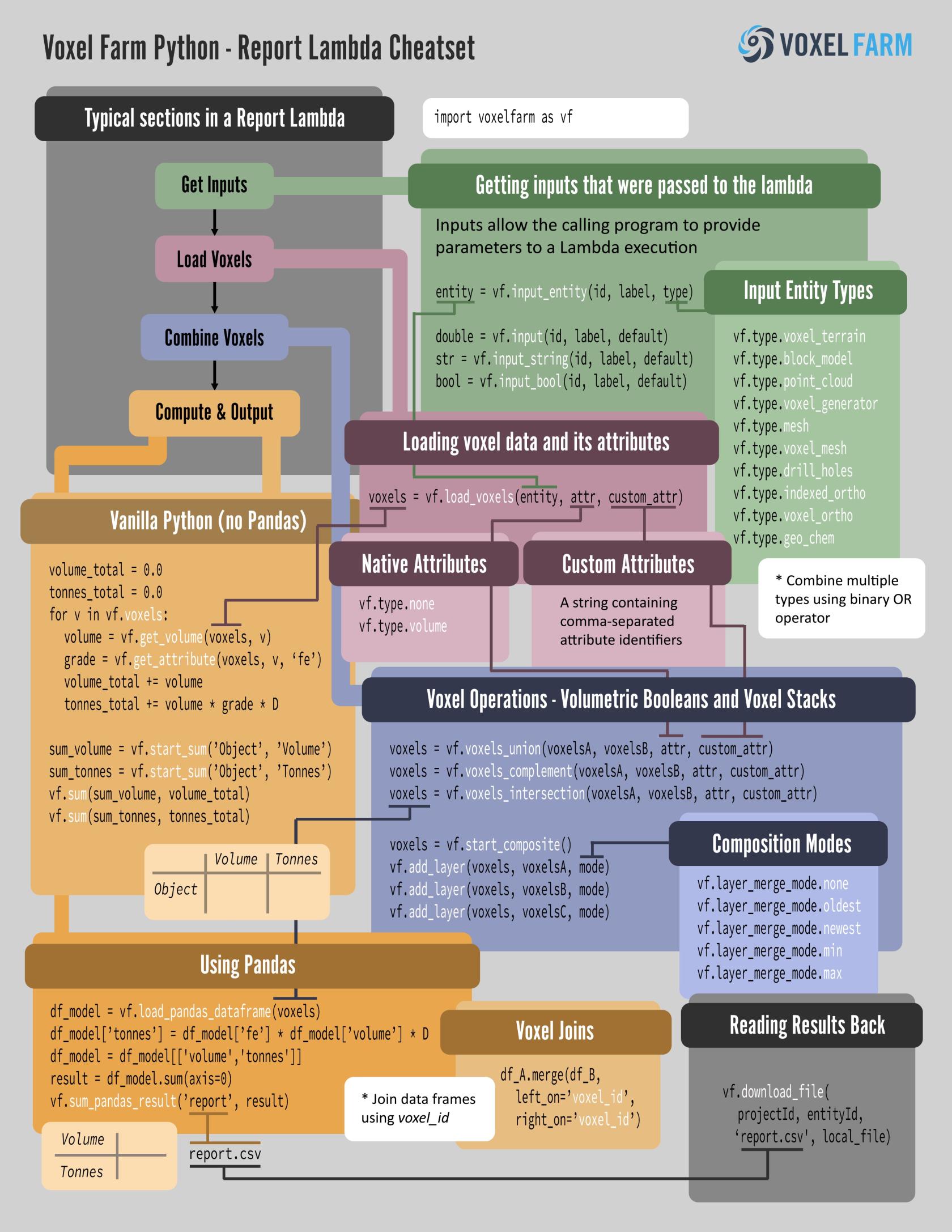](https://help.voxelspace.com/uploads/images/gallery/2025-09/report-lambda-cheatset.jpg)
# Define Report Program
This example creates a new report program.
```python
result = vf.create_lambda_python(
project=project,
type=vf.lambda_type.Report,
name="My Volume Report Lambda",
fields={},
code=open('./lambdas/ComputeVolumeLambda.py').read())
if not result.success:
print(result.error_info)
exit()
report_lambda_id = result.id
```
# Run Report Program
The following example runs an existing Report Program with a given set of inputs.
```python
# We will use a region that defines an 160 meter cube centered in the origin
region = '1,-80,80,-80,-80,80,-80,80,80,-80,80'
result = vf.create_report(
project=project,
program=report_lambda_id,
region=region,
lod=0,
name='Volume of Cube',
fields={},
inputs={
'entity' : voxmesh_id
})
if not result.success:
print(result.error_info)
exit()
report_id = result.id
```
For more information on regions and how to trigger report programs, please check out the [Triggering Reports](https://help.voxelspace.com/books/developer-manual/page/triggering-reports "Triggering Reports") topic.
# Read Report Results
This example shows how to read the results of a Report Lambda execution.
```python
# The "project" variable contains the Project ID
# The "report_id" variable contains the ID for the report entity
csvdata = vf.get_file(project, report_id, 'report.csv')
```
# Initialize Report Lambda
This example shows how to initialize the Voxel Farm library in a report Lambda program.
```python
import voxelfarm as vf
```
# Read inputs of Report Lambda
The following example shows how to read inputs from a report lambda program.
```python
mesh_entity = vf.input_entity("mesh_entity_id", "Entity", vf.type.voxel_mesh)
string_input = vf.input_string("string_input", "String Input", "")
numerical_input = vf.input("numerical_input", "Numerical Input", 0.0)
```
# Volumetric Booleans in Report
This example shows how to create volumetric boolean operations between volumetric datasets.
```python
# Get inputs, in this case the entities that will have they volumes computed
entityA = vf.input_entity("entityA", "Select Entity A", vf.type.voxel_generator | vf.type.voxel_terrain | vf.type.voxel_mesh)
entityB = vf.input_entity("entityB", "Select Entity B", vf.type.voxel_generator | vf.type.voxel_terrain | vf.type.voxel_mesh)
# Next, we will request to load voxel data for the entity
# We are only interested in volume, we will request no other attributes for voxels
voxelsA = vf.load_voxels(entityA, vf.attribute.volume, None)
voxelsB = vf.load_voxels(entityB, vf.attribute.volume, None)
voxels_union = vf.voxels_union(voxelsA, voxelsB, vf.attribute.volume, None)
voxels_intersection = vf.voxels_intersection(voxelsA, voxelsB, vf.attribute.volume, None)
voxels_complementAB = vf.voxels_complement(voxelsA, voxelsB, vf.attribute.volume, None)
voxels_complementBA = vf.voxels_complement(voxelsB, voxelsA, vf.attribute.volume, None)
```
# Load and Write Pandas
This example shows how to create a Pandas dataframe from voxels inside a Report Lambda program and output a different dataframe as a result.
```python
import pandas
import voxelfarm as vf
entity = vf.input_entity("entity", "Select Entity", vf.type.block_model)
voxels = vf.load_voxels(entity, vf.attribute.volume, 'fe, density')
df_model = vf.load_pandas_dataframe(voxels)
df_model['tonnes'] = df_model['fe'] * df_model['volume'] * df_model['density']
df_model = df_model['volume', 'tonnes']
df_output = df_model.sum(axis=0)
vf.sum_pandas_result('report', df_output)
```